🔗What is this? 🧅
Onion Patch is a drop-in upgrade for Demons Roots (Steam/GOG English edition) that applies essential improvements and adds performance and stability enhancements, as well as some new QoL features.
It aims to include everything and to be the only patch you need to fully enjoy the game.
This patch does not alter anything related to the content of the game, meaning no art, music, statistics, balance or anything else related to gameplay has been changed. The only improvements are strictly technical, as in bug fixes or correction of issues/inconsistencies/typos.
🔗Detailed list of changes
🔗Base essentials
- Includes the official uncensor patch from Kagura Games. Note: even if you don't want the R18 content, this patch is required to have the complete game. R18 content can be disabled in Options.
- Includes the Sound Test Mod by Michi to fix looping in some audio tracks.
- Added a native Linux port of the game.
🔗Bug fixes
- Fixed assets with filename with the wrong case being loaded. Since the original game was only released on Windows this was not an apparent issue, but it caused crashes on Linux.
- Fixed in-game time going too fast or too slow on refresh rates different from 60Hz. Now timers are tied to time and not to frames (plugin by oniON).
- Locked game logic to 60Hz instead of defaulting to the screen refresh rate, to fix some animations and timers being either too fast or too slow (plugin by MAC, adapted by oniON).
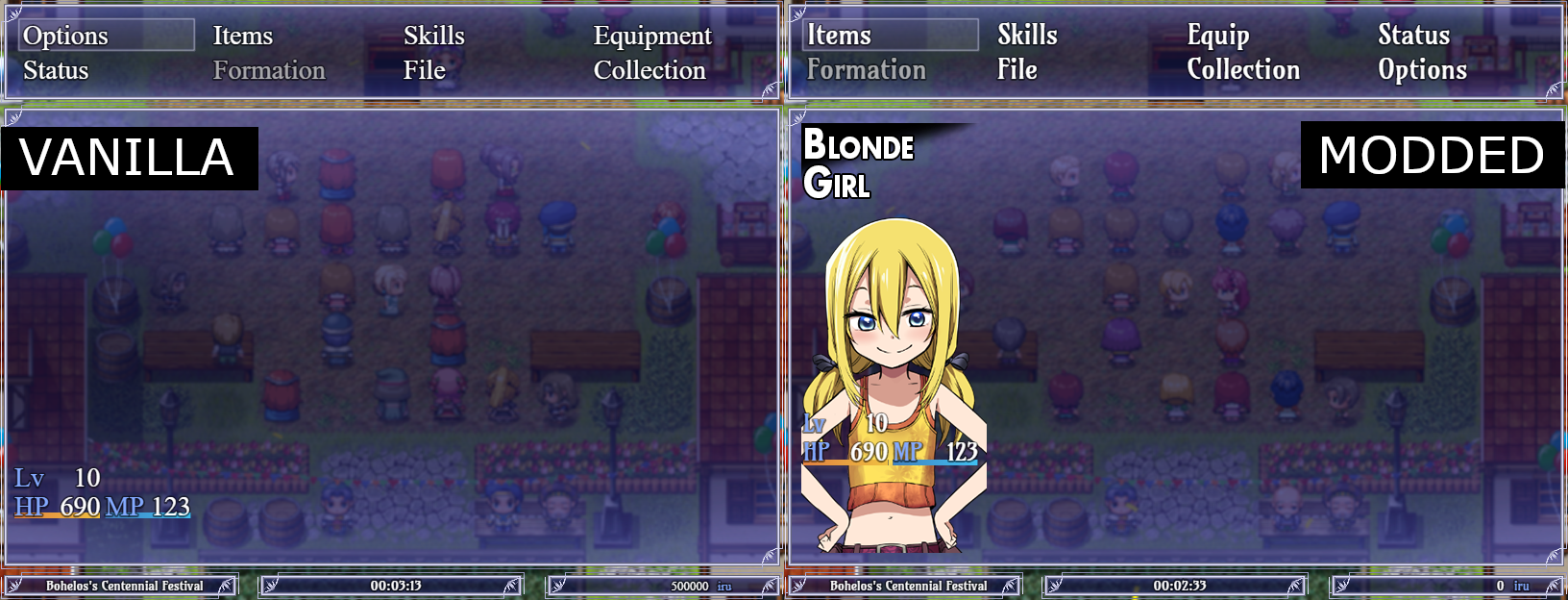
- Restored broken font. The generic serif font used in menus was not intended, it was a fallback because the declared font was not properly loaded in the English version of the game. See comparison.
- Prevented the 111_InputForm plugin from potentially wasting a lot of CPU cycles while doing nothing.
- Properly declared variables inside loops that could otherwise go outside of their intended context.
- Restored support for Steam Overlay and screenshots in Windows. This was done by adding
"chromium-args": "--in-process-gpu",to the game'spackage.jsonfile, which makes the GPU process run inside the main process. If you have issues with this, you can safely remove the entire line frompackage.json. - Removed the Audio Commentary option, as it was only implemented in the Japanese retail edition of the game and does nothing in any English or digital edition (Source).
🔗Performance and various enhancements
- Updated the game's NW.js engine from version 0.29.0 (32-bit) to version 0.49.2 (64-bit). This is still a pretty old version, but going newer could cause compatibility and performance issues because the codebase would be too far from the game's original version.
- Disabled a debug plugin that would also hook into the deployed build, impacting performance.
- Removed
console.logspam from various sources that would waste CPU. - Added an Autosave feature (optional, can be turned off in Options). It reserves the last 3 save slots and saves at each map change, with at least 30 seconds cooldown between each save to avoid save spam (plugin by FELSKI, customized and improved for Demons Roots by oniON).
- Added persistent fullscreen toggle: now the game starts in fullscreen on first launch, the status can be toggled with F4, and it persists between reloads (plugin by oniON).
🔗Aesthetics
- Added JitterFix to improve smoothness (plugin by zumikua).
- Resized some windows to better contain text.
- Dev logo is now fullscreen.
🔗Content and misc
- Minor fixes to text for consistency.
- Added version at the bottom right of the main menu to confirm installation status.
- General system stability improvements to enhance the user's experience™ (I've always dreamed of adding this line to my changelogs).
🔗Useful hotkeys
F2: Display the FPS overlay on the top-left.F3: Toggle scaling (integer vs fullscreen).F4: Toggle windowed/fullscreen.F5: Reload game.F6: Take screenshot (PNG).F7: Take screenshot (JPG).
Screenshots are saved under
captures, inside the game installation folder.